
Vue Firebase Masterclass
ตอนที่ 7: Vue + Tailwind - เพิ่ม หน้าเว็บ ฝั่ง E - Commerce
ทำส่วน Layout หลักของหน้าเว็บกัน
สารบัญ
เราจะทำอะไรกันบ้างในฝั่ง User
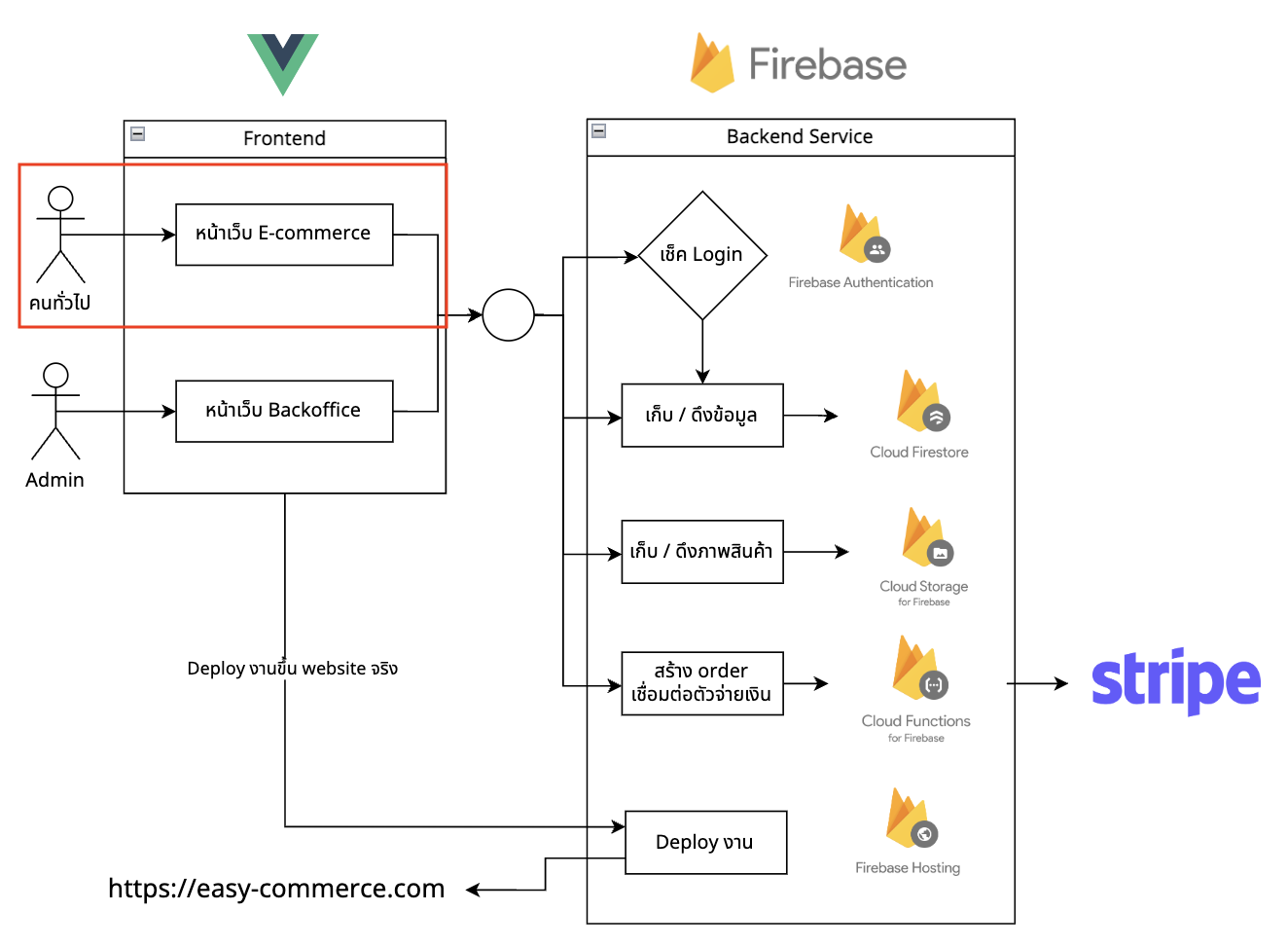
นี่คือทั้งหมดที่เราจะทำกันใน Session นี้
├── src
    ├── App.vue
    ├── components
    ├── style.css
    ├── layouts
    │   ├── UserLayout.vue --> สำหรับ navbar และ footer
    ├── stores
    │   ├── event.js --> สำหรับเพ่ิม event ที่ใช้รวม
    │   ├── user
    │       ├── product.js --> สำหรับเก็บข้อมูล product
    │       └── cart.js --> สำหรับเก็บข้อมูลตะกร้าสินค้า
    └── views
        └── user --> folder สำหรับ user view
            ├── CartView.vue --> หน้าตะกร้าสินค้า
            ├── CheckoutView.vue --> หน้าชำระเงิน
            ├── HomeView.vue --> หน้าหลัก
            ├── ProfileView.vue --> หน้า Profile
            ├── SearchView.vue --> หน้าค้นหาสินค้า
            └── SuccessView.vue --> หน้าชำระเงินสำเร็จ
โดย ฝั่งของหน้าเว็บ ที่ user ใช้งานทั้งหมดเราจะมีหน้าตามนี้คือ
- Home = หน้าหลักที่ user เปิดมาเจอหน้าแรก
- Profile = หน้าจัดการ profile ที่ user สามารถแก้ไข profile ตัวเองได้
- Cart = หน้าตะกร้าสินค้าที่จะเข้ามาหลังจากเลือกสินค้าแล้ว
- Checkout = หน้าต่อจากตะกร้าสินค้าที่เป็นการสรุปยอดรวม
- Search = หน้าค้นหาสินค้า
- Success = หลังจาก checkout เรียบร้อย (หลังชำระเงิน) แสดงหน้า ชำระเงินสำเร็จออกมา
และนี่คือหน้าภาพรวมทั้งหมดที่เราจะทำกัน ไล่ตั้งแต่หน้า Home > Search > Profile > Cart > Checkout และ Success
เริ่มต้นทำ UserLayout.vue
layouts/UserLayout.vue คือ component สำหรับสร้าง Layout หลักของหน้า User เอาไว้ โจทย์ของ component นี้คือ
- เราจะสร้างส่วนหัวของเว็บไซต์ และส่วนท้ายของเว็บไซต์ที่ไม่ว่าเราเปิดจากหน้าไหน จะต้องใช้งานร่วมกัน = ทำเป็น Parent component ของตัวนั้นไว้
- เราจะใช้ concept
<slot></slot>ในการแทรก component ที่เป็น component ของตัวลูกที่เราจะใช้ร่วมกันอีกที
เช่นเคสตามเอกสาร Vue นี้
- เราสร้าง FancyButton ที่สามารถแทรกตรงกลางเข้าไปได้
- เมื่อไหร่ก็ตามที่เราใส่อะไรเอาไว้ระหว่าง
<FancyButton></FancyButton>= มันจะมาแทนตรงslotของ component นั้นได้ - concept นี้มันจะเอาไว้ใช้ทำสิ่งที่เรียกกันว่า
template contentคือการที่ component เป็นตัวหลักในการแสดงผล และเอาสิ่งอื่นมาแทรกตรงกลางแทน
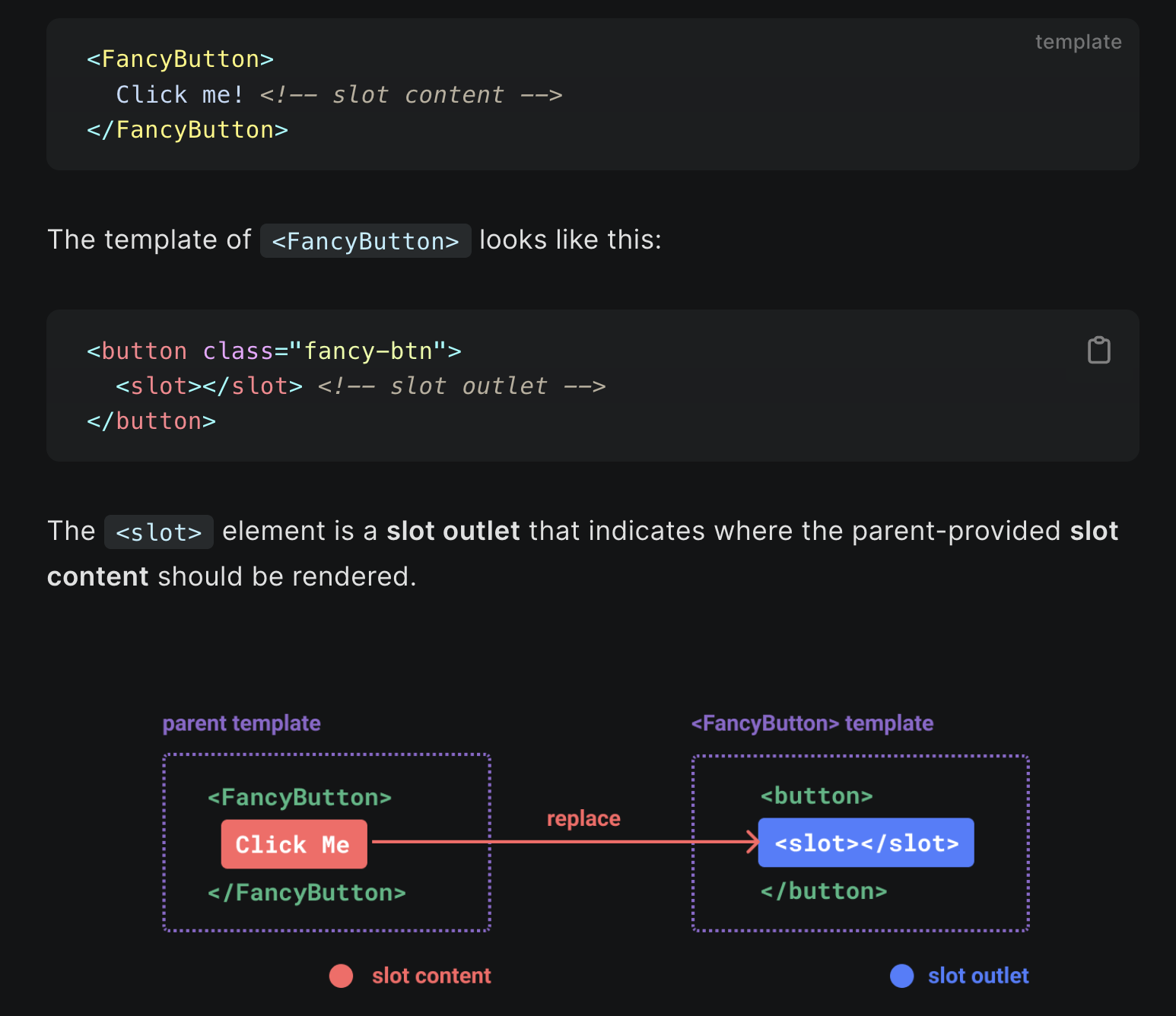
เอกสารต้นฉบับ https://vuejs.org/guide/components/slots.html#slots
checklist ที่เราจะทำ
- สร้าง style โดยเพิ่ม navbar เข้ามาที่ประกอบไปด้วย
- หัวข้อ logo (ด้านซ้ายสุด)
- search box (ที่วางไว้ก่อนยังไม่เพิ่ม action อะไร)
- icon ตะกร้า พร้อมจำนวนสินค้า
- Login
- เพิ่ม login / logout โดย
- ตอนแรกสุด ให้แสดงเป็นคำว่า Login
- หลังจากกด Login ให้เปลี่ยนเป็น Icon รูปคนและสามารถกดเมนู Profile และ Logout ออกมาดูได้
- ทั้งหมดใช้ localstorage ในการจำ state (เนื่องจากยังไม่มี Backend)
- เมื่อกด logout ให้กลับมาแสดงคำว่า Login และล้าง state เหมือนเดิม
- เพิ่ม pop-up ตรงตะกร้าสินค้ามา
- เมื่อกด pop-up จะแสดงราคารวมของสินค้าและไปยังหน้าตะกร้า
- เพิ่ม footer เข้าไป (โดยให้ดูทรงเป็นเว็บไซต์จริงๆเฉยๆ)
- เพิ่ม
<slot></slot>เข้าไป เพื่อ mark จุดลงใน component ในแต่ละหน้า = ทุกหน้าจะมาแทรกกลางระหว่าง header (navbar) และ footer นี้
<script setup>
import { ref, onMounted } from 'vue'
import { RouterLink, useRouter } from 'vue-router'
const isLoggedIn = ref(false)

const router = useRouter()

onMounted(() => {
  if (localStorage.getItem('login')) {
    isLoggedIn.value = true
  }
})

const login = () => {
  isLoggedIn.value = true
  localStorage.setItem('login', true)
}

const logout = () => {
  isLoggedIn.value = false
  localStorage.removeItem('login')
  localStorage.removeItem('cart-item')
  localStorage.removeItem('checkout-data')
  window.location.reload()
}
</script>

<template>
  <div class="max-w-screen-xl mx-auto">
    <div class="navbar bg-base-100">
      <div class="flex-1">
        <RouterLink to="/" class="btn btn-ghost normal-case text-xl">Mikelopster Shop</RouterLink>
      </div>
      <div class="flex-none">
        <div class="form-control">
          <input
            type="text"
            v-model="searchText"
            placeholder="Search"
            class="input input-bordered w-24 md:w-auto"
          />
        </div>
        <div class="dropdown dropdown-end">
          <label tabindex="0" class="btn btn-ghost btn-circle">
            <div class="indicator">
              <svg xmlns="http://www.w3.org/2000/svg" class="h-5 w-5" fill="none" viewBox="0 0 24 24" stroke="currentColor"><path stroke-linecap="round" stroke-linejoin="round" stroke-width="2" d="M3 3h2l.4 2M7 13h10l4-8H5.4M7 13L5.4 5M7 13l-2.293 2.293c-.63.63-.184 1.707.707 1.707H17m0 0a2 2 0 100 4 2 2 0 000-4zm-8 2a2 2 0 11-4 0 2 2 0 014 0z" /></svg>
              <span class="badge badge-sm indicator-item">0</span>
            </div>
          </label>
          <div tabindex="0" class="mt-3 z-[1] card card-compact dropdown-content w-52 bg-base-100 shadow">
            <div class="card-body">
              <span class="font-bold text-lg">0 Items</span>
              <span class="text-info">Subtotal: 100฿</span>
              <div class="card-actions">
                <RouterLink to="/cart" class="btn btn-primary btn-block">
                  View cart
                </RouterLink>
              </div>
            </div>
          </div>
        </div>
        <div v-if="!isLoggedIn" class="btn btn-ghost" @click="login">
          Login
        </div>
        <div v-else class="dropdown dropdown-end">
          <label tabindex="0" class="btn btn-ghost btn-circle avatar">
            <div class="w-10 rounded-full">
              <img src="https://mikelopster.dev/mikelopster.da6b9a03.webp" />
            </div>
          </label>
          <ul tabindex="0" class="menu menu-sm dropdown-content mt-3 z-[1] p-2 shadow bg-base-100 rounded-box w-52">
            <li>
              <RouterLink to="/profile" class="justify-between">
                Profile
              </RouterLink>
            </li>
            <li>
              <a @click="logout">Logout</a>
            </li>
          </ul>
        </div>
      </div>
    </div>
    <slot></slot>
    <footer class="footer p-10 bg-neutral text-neutral-content">
      <div>
        <span class="footer-title">Services</span>
        <a class="link link-hover">Branding</a>
        <a class="link link-hover">Design</a>
        <a class="link link-hover">Marketing</a>
        <a class="link link-hover">Advertisement</a>
      </div>
      <div>
        <span class="footer-title">Company</span>
        <a class="link link-hover">About us</a>
        <a class="link link-hover">Contact</a>
        <a class="link link-hover">Jobs</a>
        <a class="link link-hover">Press kit</a>
      </div>
      <div>
        <span class="footer-title">Legal</span>
        <a class="link link-hover">Terms of use</a>
        <a class="link link-hover">Privacy policy</a>
        <a class="link link-hover">Cookie policy</a>
      </div>
    </footer>
  </div>
</template>
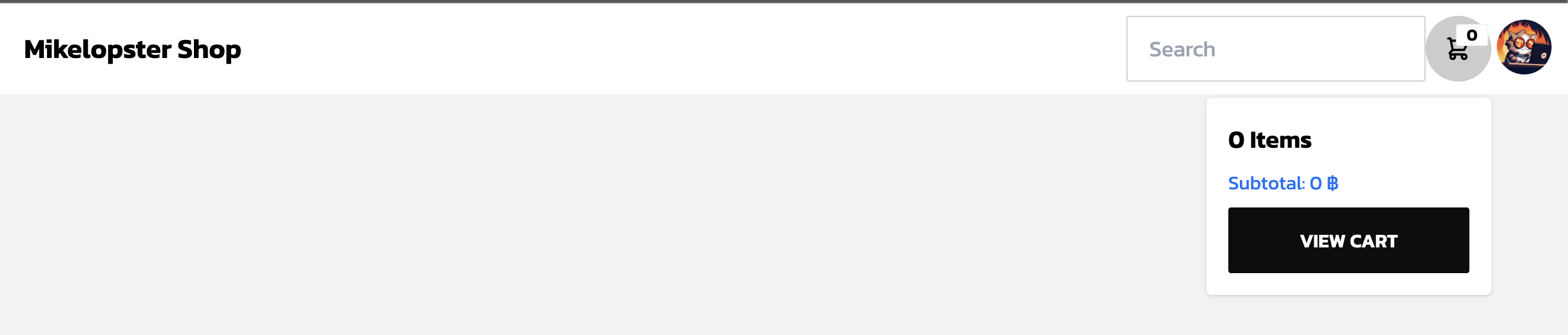
ผลลัพธ์
state ปกติ

state login แล้ว (หลังจากกดปุ่ม Login) > กดเมนูตรงรูป

เมื่อกดตะกร้า > แสดงเมนูตะกร้าออกมา
เพิ่ม router และสร้าง template ทุกหน้าขึ้นมา
เพิ่ม router สำหรับ file ทุกหน้าของ user โดยมีหน้าดังนี้
/= หน้า Home/search= หน้า Search (สำหรับค้นหา Product)/profile= หน้า Profile (สำหรับแก้ไข Profile)/cart= หน้า Cart (สำหรับดูสินค้าที่เอาเข้าตะกร้าสินค้า)/checkout= หน้า Checkout (สำหรับหน้าสรุปตะกร้าสินค้า)/success= หน้า Success (จบรายการหลังจาก Checkout)
และทำการสร้าง template เปล่าให้กับทุก file ของ .vue ของแต่ละหน้า (HomeView.vue, SearchView.vue, ProfileView.vue, SuccessView.vue, CheckoutView.vue, CartView.vue)
import Home from '@/views/user/HomeView.vue'
import Search from '@/views/user/SearchView.vue'
import Profile from '@/views/user/ProfileView.vue'
import Success from '@/views/user/SuccessView.vue'
import Checkout from '@/views/user/CheckoutView.vue'
import Cart from '@/views/user/CartView.vue'

const router = createRouter({
  history: createWebHistory(import.meta.env.BASE_URL),
  routes: [
    {
      path: '/',
      name: 'home',
      component: Home
    },
    {
      path: '/search',
      name: 'search',
      component: Search
    },
    {
      path: '/profile',
      name: 'profile',
      component: Profile
    },
    {
      path: '/cart',
      name: 'cart',
      component: Cart
    },
    {
      path: '/checkout',
      name: 'checkout',
      component: Checkout
    },
    {
      path: '/success',
      name: 'success',
      component: Success
    },
  ]
})

export default router