Vue Firebase Masterclass
ตอนที่ 14: Vue + Firebase - เพิ่ม Cart ด้วย Firebase Realtime Database
เพิ่ม Realtime Database
สารบัญ
เรามาทำทั้ง 2 case กัน โดยเราจะพาใช้ Realtime database ผ่าน 2 feature คือ
- เพิ่มตะกร้าสินค้า (สำหรับเคสที่ login)
- เพิ่ม "flash sale ads" ที่เก็บ banner การแสดงผลเอาไว้
เพิ่มตะกร้าสินค้า
เปลี่ยน cart (ตะกร้าสินค้า) มาใช้ realtime database โดย
- ถ้าไม่ login = ใช้ localstorage ตามเดิม
- ถ้า login = ใช้ realtime database เพื่อ login ที่เครื่องอื่นจะได้ตะกร้าสินค้าตามมาด้วย
- ใช้ uid ของ user เป็น key ของ cart
carts/<uid>
โดยสิ่งนี้สามารถทำได้โดยการแก้เพียง store อย่างเดียว ** เราจะยังไม่แก้ checkout เราจะแก้ทีเดียวในหัวข้อ cloud function กัน
stores/user/cart.js
javascript
import { defineStore } from 'pinia'

import {
  ref,
  set,
  onValue
} from 'firebase/database'

import {
  db,
  realtimeDB
} from '@/firebase'

import { useAccountStore } from '@/stores/account'

export const useUserCartStore = defineStore('user-cart', {
  state: () => ({
    items: [],
    checkout: {}
  }),
  getters: {
    /* เพิิ่ม user, cartRef */
    user (state) {
      const accountStore = useAccountStore()
      return accountStore.user
    },
    cartRef (state) {
      return ref(realtimeDB, `carts/${this.user.uid}`)
    }
  },
  actions: {
    loadCart () {
      if (this.user.uid) {
        // เพิ่ม realtime dabase ให้กับตะกร้าสินค้า
        onValue(this.cartRef, (snapshot) => {
          const data = snapshot.val()
          this.items = data || []
          console.log('data', data)
        })
      } else {
        // ถ้าเป็น guest = ใช้ localstorage
        const cartItem = localStorage.getItem('cart-item')
        if (cartItem) {
          this.items = JSON.parse(cartItem)
        }
      }
    },
    async addToCart (productData) {
      const itemIndex = this.items.findIndex(
        item => item.name === productData.name
      )
      if (itemIndex >= 0) {
        this.updateQuantity(itemIndex, this.items[itemIndex].quantity + 1)
      } else {
        productData.quantity = 1
        this.items.push(productData)
      }

      // ทำการเพิ่มของเข้า cart ลง realtime database
      await set(this.cartRef, this.items)
      localStorage.setItem('cart-item', JSON.stringify(this.items))
    },
    async updateQuantity (index, quantity) {
      this.items[index].quantity = parseInt(quantity)
      // ทำการเพิ่มจำนวนของเข้า cart ลง realtime database
      await set(this.cartRef, this.items)
      localStorage.setItem('cart-item', JSON.stringify(this.items))
    },
    async removeItemInCart (index) {
      this.items.splice(index, 1)
      // ทำการ update cart หลังลบ product ใน cart แล้ว
      await set(this.cartRef, this.items)
      localStorage.setItem('cart-item', JSON.stringify(this.items))
    },
  }
})
เพิ่ม feature “Flash sale ads”
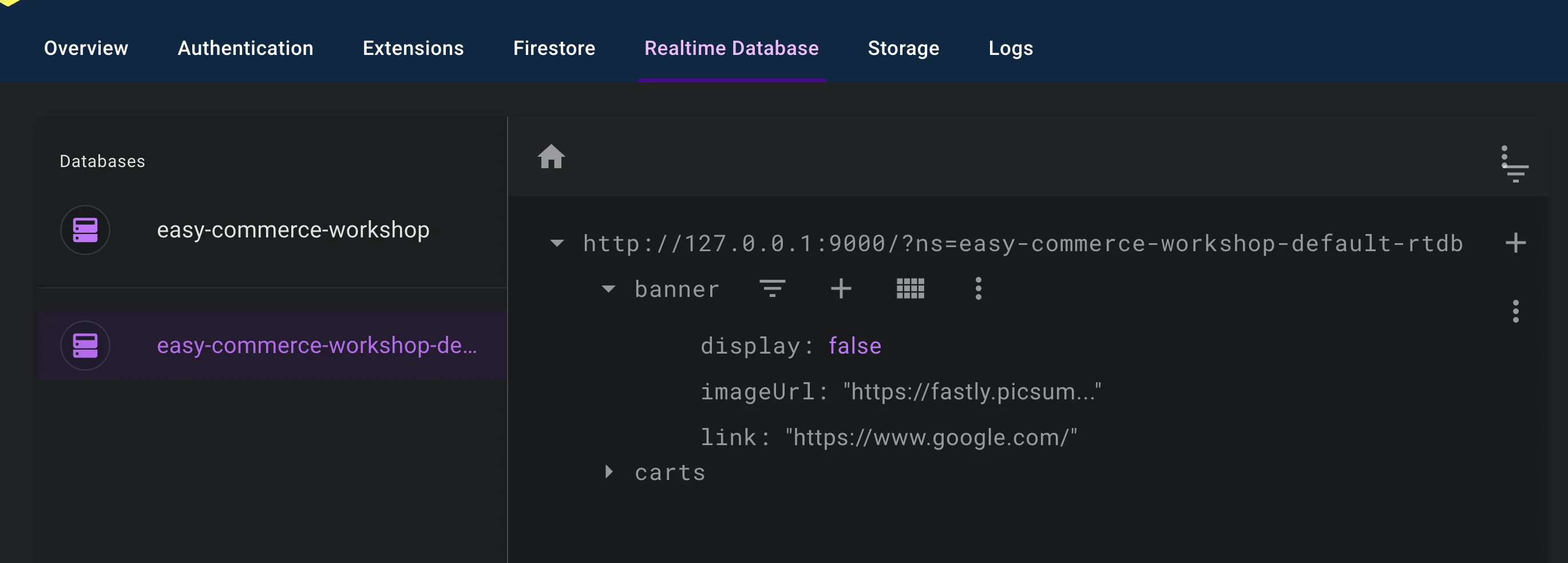
- เพิ่ม realtime db 1 ตัวพร้อมภาพ banner และ link banner
- เพิ่มตัวแปรสำหรับการเปิด / ปิด การแสดงผลเอาไว้
หน้าตา realtime database ที่เพิ่มจะเป็น key ประมาณนี้
stores/event.js
- เพิ่ม function
loadBanner()เข้ามาเพื่อทำการ subscribe เอาไว้ - เมื่อมีการเปลี่ยนแปลงก็จะมา update state ของ banner เอง
javascript
import { defineStore } from 'pinia'

import {
  ref,
  onValue
} from 'firebase/database'

import { realtimeDB } from '@/firebase'

export const useEventStore = defineStore('event', {
  state: () => ({
    alert: false,
    data: {},
    banner: {} // เพิ่ม object banner
  }),
  actions: {
    loadBanner () {
      const bannerRef = ref(realtimeDB, 'banner')
      onValue(bannerRef, (snapshot) => {
        this.banner = snapshot.val()
      })
    },
  }
})
src/layouts/UserLayout.vue
- เพิ่มตัวรับ banner ไว้
html
<script setup>
import { ref, onMounted } from 'vue'

import { useEventStore } from '@/stores/event'

const eventStore = useEventStore()

onMounted(() => {
  eventStore.loadBanner()
})
</script>

<template>
  <div class="max-w-screen-xl mx-auto">
    <!-- เพิ่มส่วนแสดง banner ออกมา  -->
    <div v-if="eventStore.banner.display" class="w-full">
      <a :href="eventStore.banner.link" target="_blank">
        <img class="w-full" :src="eventStore.banner.imageUrl">
      </a>
    </div>

    <slot></slot>
  </div>
</template>
ผลลัพธ์