Vue Firebase Masterclass
ตอนที่ 12: Vue + Firebase - จัดการ filter, sort ด้วย Firestore query
แนะนำ query ใน Firestore
สารบัญ
สามารถดู video ของหัวข้อนี้ก่อนได้ ดู video
Query ใน Firestore คืออะไร ?
เอกสารต้นฉบับ: https://firebase.google.com/docs/firestore/query-data/queries
Cloud Firestore นั้นนอกจากการ CRUD ทั่วไปแล้ว ยังมีความสามารถในการ
- ดึงข้อมูลตาม condition (where)
- เรียงข้อมูลตาม field (orderBy)
- จำกัดการแสดงผลข้อมูล (limit)
- การทำ pagination ตามการเรียงข้อมูล (startAt, startAfter, endBefore, endAt)
- รวมถึงการจัดการตาม transaction (batch, transaction) ** เราจะยังไม่ได้เล่นในหัวข้อนี้ เราจะเก็บไปเล่นกันตอน cloud function กันตอนทำตาม transaction จริงกัน
Session นี้เราจะมาเล่น where (ใช้ไปแล้วในหัวข้อก่อนหน้านี้ตอนเรียกข้อมูลฝั่งหน้าบ้าน) , orderBy, limit
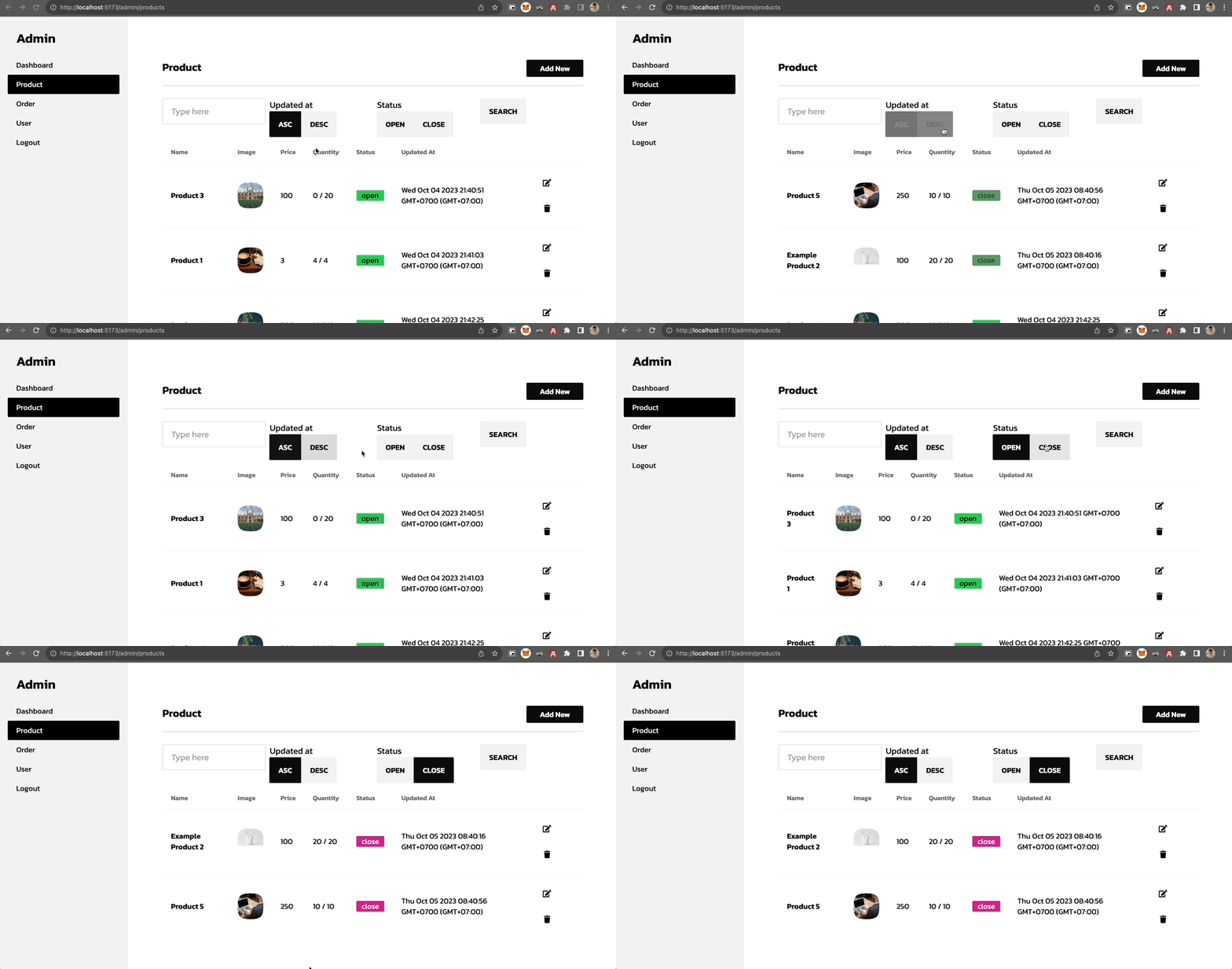
Search และ sort product ใน admin
เพิ่มทั้งหมด 3 อย่าง
- search ชื่อ product
- search status (open, close) ของ product
- sort product ตามวันที่ update (updatedAt)
เพิ่ม stores/admin/product.js
javascript
import { defineStore } from 'pinia'

import {
  collection,
  getDocs,
  doc,
  addDoc,
  getDoc,
  setDoc,
  deleteDoc,
  // เพิ่ม query, where, orderBy สำหรับการทำ condition เข้ามา
  query,
  where,
  orderBy,
} from 'firebase/firestore'

import { db } from '@/firebase'

export const useProductStore = defineStore('product', {
  state: () => ({
    docList: [],
    total: 0,
    search: {
      text: '',
      status: '',
      sort: 'asc'
    }
  }),
  getters: {
    /* code เหมือนเดิม */
  },
  actions: {
    async loadProduct () {
      try {
        let productsCol = query(
          collection(db, 'products')
        )
        // เพิ่ม filter text
        if (this.search.text) {
          productsCol = query(
            productsCol,
            where('name', '==', this.search.text),
          )
        }
        // เพิ่ม filter status
        if (this.search.status) {
          productsCol = query(
            productsCol,
            where('status', '==', this.search.status),
          )
        }
        // เพิ่ม การเรียงลำดับ updatedAt เข้ามา
        const countProductQuery = query(
          productsCol,
          orderBy('updatedAt', this.search.sort),
        )

        const productSnapshot = await getDocs(productsCol)
        this.docList = productSnapshot.docs || []
        this.page.activePage = 1
      } catch (error) {
        console.log('error', error)
      }
    },
    async changeSortOrder (newSort) {
      try {
        this.search.sort = newSort
        await this.loadProduct()
      } catch (error) {
        console.log('error', error)
      }
    },
    async changeFilterStatus (newStatus) {
      try {
        this.search.status = newStatus
        await this.loadProduct()
      } catch (error) {
        console.log('error', error)
      }
    }
  }
})
เพิ่ม admin/product/ListView.vue
html
<script setup>
/* code ที่เหลือเหมือนเดิม */

const productStore = useProductStore()

// เพิ่ม search เข้ามาเพื่อใช้สำหรับเรียกแยก
const search = async () => {
  await productStore.loadProduct()
}
</script>

<template>
  <AdminLayout>
  <div class="flex-1  pt-8 px-6 bg-base-100">
      <div class="card w-full p-6 mt-2">
        <div class="text-xl font-semibold inline-block">
          Product
          <div class="inline-block float-right">
            <div class="inline-block float-right">
              <RouterLink
                to="/admin/products/create"
                class="btn px-6 btn-sm normal-case btn-primary"
              >
                Add New
              </RouterLink>
            </div>
          </div>
        </div>
        <div class="divider mt-2"></div>
        <!-- เพิ่ม filter 3 อย่างเข้าไปคือ ชื่อ, updated at, status -->
        <div class="flex justify-between">
          <div class="flex-1">
            <input v-model="productStore.search.text" placeholder="Type here" class="input input-bordered w-full" />
          </div>
          <div class="flex-1 ml-2">
            Updated at
            <div class="btn-group">
              <button
                class="btn"
                :class="productStore.search.sort === 'asc' ? 'btn-active' : ''"
                @click="productStore.changeSortOrder('asc')">
                ASC
              </button>
              <button
                class="btn"
                :class="productStore.search.sort === 'desc' ? 'btn-active' : ''"
                @click="productStore.changeSortOrder('desc')">
                DESC
              </button>
            </div>
          </div>
          <div class="flex-1 ml-2">
            Status
            <div class="btn-group">
              <button
                class="btn"
                :class="productStore.search.status === 'open' ? 'btn-active' : ''"
                @click="productStore.changeFilterStatus('open')">
                open
              </button>
              <button
                class="btn"
                :class="productStore.search.status === 'close' ? 'btn-active' : ''"
                @click="productStore.changeFilterStatus('close')">
                close
              </button>
            </div>
          </div>
          <div class="flex-1">
            <button class="btn" @click="search">Search</button>
          </div>
        </div>
        <div class="h-full w-full pb-6 bg-base-100 mt-2">
          <div class="overflow-x-auto w-full">
            <table class="table w-full">
              <thead>
                <tr>
                  <th>Name</th>
                  <th>Image</th>
                  <th>Price</th>
                  <th>Quantity</th>
                  <th>Status</th>
                  <th>Updated At</th>
                  <th></th>
                </tr>
              </thead>
              <tbody>
                <tr v-for="(product, index) in productStore.list" :key="index">
                  <td>
                    <div class="font-bold">{{ product.name }}</div>
                  </td>
                  <td>
                    <div class="mask mask-squircle w-12 h-12">
                      <img :src="product.imageUrl" />
                    </div>
                  </td>
                  <td>{{ product.price }}</td>
                  <td>{{ product.remainQuantity }} / {{ product.quantity }}</td>
                  <td>
                    <div class="badge" :class="product.status === 'open' ? 'badge-success' : 'badge-error'">
                      {{ product.status }}
                    </div>
                  </td>
                  <td>{{ product.updatedAt }}</td>
                  <td>
                    <RouterLink :to="{ name: 'admin-products-update', params: { id: product.uid } }">
                      <button class="btn btn-square btn-ghost">
                        <EditIcon></EditIcon>
                      </button>
                    </RouterLink>
                    <button @click="removeProduct(index)" class="btn btn-square btn-ghost">
                      <TrashIcon></TrashIcon>
                    </button>
                  </td>
                </tr>
              </tbody>
            </table>
            <Pagination
              :maxPage="productStore.totalPage"
              :activePage="productStore.page.activePage"
              :changePage="changePage"
            ></Pagination>
          </div>
        </div>
      </div>
    </div>
  </AdminLayout>
</template>
ผลลัพธ์ของการเพิ่ม search และ sort