
Vue Firebase Masterclass
ตอนที่ 4: Vue - Vue router และ Pinia
เริ่มต้น Pinia
สารบัญ
ย้ายมาฝั่ง Pinia บ้าง
Document ต้นฉบับ: https://pinia.vuejs.org/core-concepts/
คราวนี้เราจะมาลองสร้าง state ที่สามารถเรียกใช้ได้จากทั้ง 2 หน้า (HomeView และ ProfileView) บ้าง
- ปกติ วิธีส่งข้อมูลของเรา เราจะส่งผ่าน Prop เข้าไป
- แต่ทีนี้ เราจะสร้าง state ตรงกลางขึ้นมา 1 ตัวเพื่อเป็นตัวกลางในการส่งค่าแทน
โครงสร้างพื้นฐานของ store คือ
- store จะเป็น file javascript 1 file ที่จะทำการ register store เอาไว้ผ่าน method
defineStore()และกำหนดชื่อ store ผ่าน defineStore ได้ - กำหนดข้อมูลที่จะเก็บใน store ผ่าน
stateของ object store ไว้ได้ - สามารถสร้าง method เพื่อเรียกใช้จาก store ได้ผ่าน
actionของ object store ไว้ได้
ตัวอย่าง code ของ store pinia
import { defineStore } from 'pinia'

export const useCountersStore = defineStore('counters', {
  state: () => ({ // กำหนดข้อมูล state ที่จะเก็บใน store นี้
    count: 0
  }),
  actions: { // function ที่จะใช้ใน store นี้
    increment() {
      this.count++
    }
  }
})
เมื่อ component ไหนต้องการเรียกใช้ ให้ทำการ import ตัว store เข้ามาใช้ และสามารถเรียกใช้ผ่าน key ของตัวแปร store ได้เลย
<script setup>
import { RouterLink } from 'vue-router'
import { useCountersStore } from '../stores/counters' // สมมุติว่า store อยู่ที่นี่

const counters = useCountersStore()

</script>

<template>
  <div>
    <div>{{ counters.count }}</div>
    <button @click="counters.increment()">Add count</button>
  </div>
</template>
และนี่ก็คือวิธีการ define และการใช้ store pinia
มาลองทำกัน Pinia กับการส่งข้อมูลข้ามหน้ากัน
Document ต้นฉบับ
- https://pinia.vuejs.org/core-concepts/state.html สำหรับ state
- https://pinia.vuejs.org/core-concepts/actions.html สำหรับการสร้าง method ใน store (action)
โจทย์ที่เราจะลองคือ
- เราจะสร้าง store ตัวหนึ่งสำหรับเก็บ profile user ขึ้นมา
- เสร็จแล้วเราจะ update ข้อมูลเข้า store (จากหน้า ProfileView) แล้วนำไปแสดงที่หน้าหลัก (HomeView)
เราจะทำการลบ ไฟล์ที่อยู่ใน stores ทั้งหมด (ที่เก็บ store pinia) และสร้างใหม่เป็น stores/user.js แทน
Structure file ก็จะเป็นตามนี้
├── src
    ├── App.vue --> Root component เหมือนเดิม
    ├── router --> folder ของ router
    │   └── index.js
    ├── stores --> folder ของ state management pinia
    │   └── user.js
    └── views
        ├── Profile.vue
        └── HomeView.vue
เรามาเริ่มที่ stores/user.js ก่อน ตอนนี้เราจะทำการสร้าง store ชื่อ user ขึ้นมาเป็น state ตรงกลางสำหรับเก็บข้อมูลของ user โดยเราจะ
- เก็บข้อมูล firstname, lastname เอาไว้ใน store
- และสร้าง method สำหรับ update profile จาก firstname, lastname ลง store
code จะออกมาเป็นตามนี้
import { defineStore } from 'pinia'

export const useUserStore = defineStore('user', {
  state: () => ({
    firstname: '',
    lastname: ''
  }),
  actions: {
    updateProfile(userData) {
      this.firstname = userData.firstname
      this.lastname = userData.lastname
    }
  }
})
กลับมาที่ ProfileView.vue เราจะทำการ update code เพื่อให้สามารถเรียกใช้ store (ผ่าน userUserStore()) และ update store ผ่าน method updateProfile() ใน store นั้น
<script setup>
import { RouterLink } from 'vue-router'
import { useUserStore } from '../stores/user'
import { onMounted, ref, watch } from 'vue'

// define user store ขึ้นมา
const user = useUserStore()

const firstname = ref('')
const lastname = ref('')
const isUpdated = ref(false)

const updateProfile = () => {
  // เรียกใช้ updateProfile ใน user store
  user.updateProfile({
    firstname: firstname.value,
    lastname: lastname.value
  })
  // บอกว่าข้อมูล up to date แล้ว
  isUpdated.value = true
}

// ดักจับเพื่อปรับตัวแปร isUpdated เป็น false เพื่อบอกว่าข้อมูลยังไม่ up to date
watch([firstname, lastname], () => {
  isUpdated.value = false
})

// เริ่มต้น เราจะนำข้อมูลจาก store เก็บเข้ามาในตัวแปรของ component ก่อน
onMounted(() => {
  firstname.value = user.firstname
  lastname.value = user.lastname
})
</script>

<template>
  <div>
    Profile page
    <div>
      <div>Firstname</div>
      <input type="text" v-model="firstname">
    </div>
    <div>
      <div>Lastname</div>
      <input type="text" v-model="lastname">
    </div>
    <div v-if="isUpdated">
      Profile update to store
    </div>
    <button @click="updateProfile()">Update profile</button>
    <div>
      <RouterLink to='/'>Go to home</RouterLink>
    </div>
  </div>
</template>
มาที่ HomeView.vue ทำการเรียกใช้ store เพื่อแสดงข้อมูล firstname, lastname ใน store มา
<script setup>
import { RouterLink } from 'vue-router'
import { useUserStore } from '../stores/user'

const user = useUserStore()

</script>

<template>
  <div>
    <div>
      (From profile)
      <div>Firstname: {{ user.firstname }}</div>
      <div>Lastname: {{ user.lastname }}</div>
    </div>
    <div>
      <RouterLink :to="{
        name: 'profile',
        params: { id: 1 }
      }">Go to profile</RouterLink>
    </div>
  </div>
</template>
ผลลัพธ์จะออกมาเป็นตามนี้
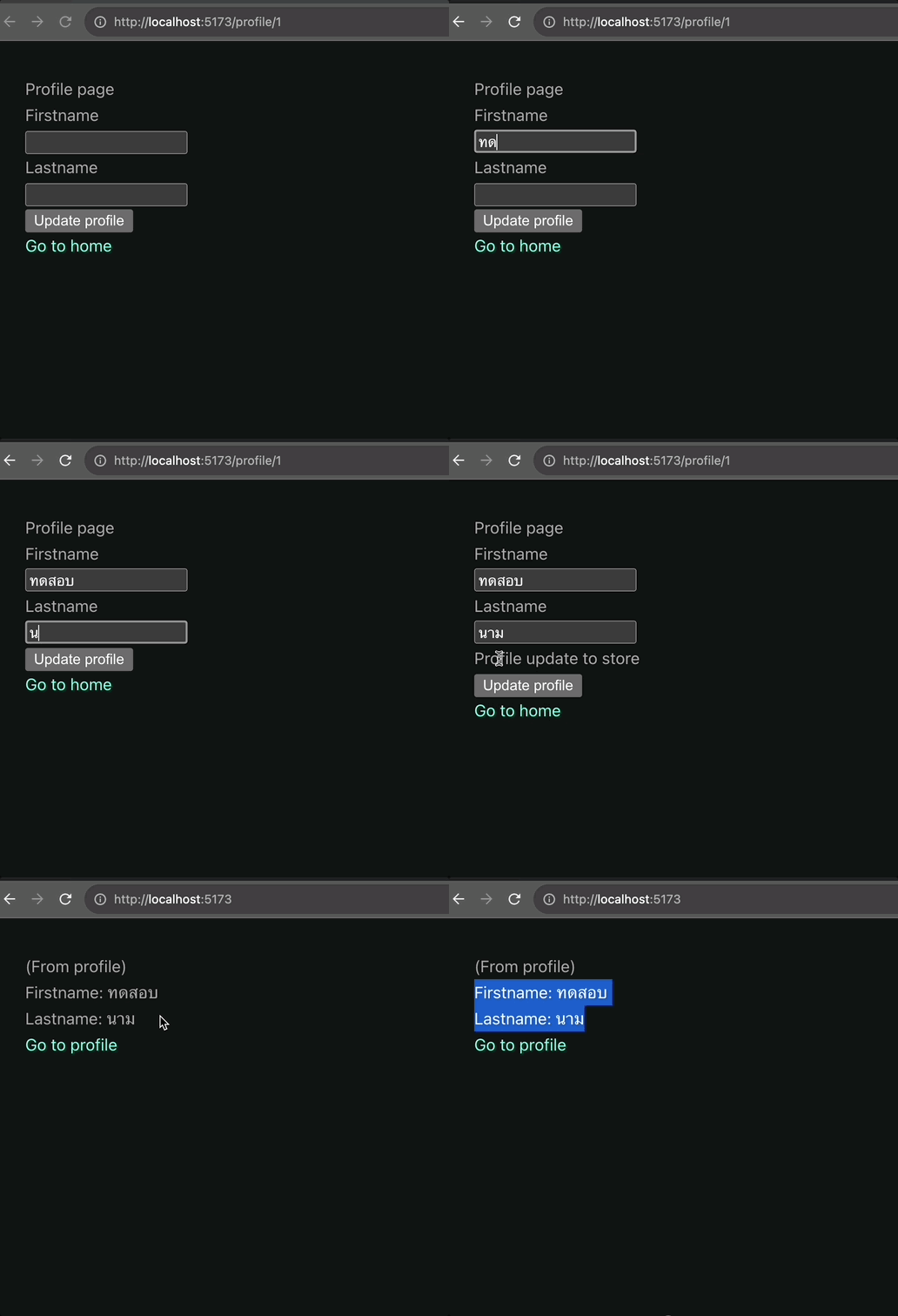
จาก code นี้สิ่งที่เราทำคือ
- เราสร้าง store user ขึ้นมา เก็บข้อมูลเอาไว้
- เราสร้าง method สำหรับการ update store user เอาไว้ (ผ่าน action) = หากใครต้องการทำอะไรกับ store ตัวนี้ให้เรียกใช้ผ่าน method ตัวนี้ได้
เท่ากับว่า code ทั้งหมดของการจัดการ store จะสามารถเรียกใช้จาก component ไหนก็ได้ = มันก็จะสามารถส่งข้อมูลต่อไปยัง component ต่างๆได้